Web Pages & Application State
If you've ever recorded a browsing session and tried to replay it, you already know the punchline: it doesn't work. Modern web applications are more complex than they appear, and understanding how they maintain state is essential for successful load testing.
Why Configuration Matters
When you record a browsing session, Load Tester captures every HTTP request and response exactly as they occurred. The challenge is that web applications don't work like static pages. They generate unique, dynamic values for each user session, so simply replaying the exact same recorded requests will fail because:
- Session IDs change with each login
- CSRF tokens expire after single use
- Hidden form fields contain session-specific state
- URLs may contain user-specific or time-based parameters
Without configuration, your replay will send stale recorded values instead of fresh runtime values, causing authentication failures, validation errors, and incorrect application behavior.
Authentication is the Hardest Part
Almost every load test that's hard is hard because of authentication. Modern anti-bot defenses (CAPTCHA, MFA, device fingerprinting, IP reputation, JavaScript challenges) are designed to stop exactly the kind of automated traffic a load test generates. For most sites, patient configuration plus ASM and the AI assistant is enough. For high-security sites (banking, healthcare, government), a separate test environment that relaxes the most aggressive defenses is the standard answer. See The Anti-Bot Reality before you spend a week trying to script around a CAPTCHA.
Understanding Web Application State
Configuring your test case effectively requires understanding how web applications maintain state across multiple requests. There are several key mechanisms:
Cookies
What they are: Small data files stored by the browser and sent with each request to the same domain.
How they work: The server sets cookies (like JSESSIONID=abc123) in response headers. The browser automatically includes these cookies in subsequent requests to prove identity and maintain session state.
Load testing impact: - Cookies are automatically handled by the Load Tester - Session cookies must be extracted from server responses and used in subsequent requests - Each virtual user needs its own unique session cookie
Hidden Form Fields
What they are: HTML form inputs with type="hidden" that users don't see but browsers submit.
How they work: Applications embed state data in hidden fields like:
<input type="hidden" name="csrf_token" value="a1b2c3d4e5f6..." />
<input type="hidden" name="__VIEWSTATE" value="/wEPDwUJ..." />
Load testing impact:
- Hidden fields often contain session-specific or request-specific values
- Values must be extracted from one response and inserted into subsequent requests
- .NET __VIEWSTATE, Rails authenticity_token, and CSRF tokens are common examples
Dynamic URL Parameters
What they are: Unique identifiers embedded in URL paths or query strings.
How they work: Applications generate URLs like:
/checkout/session/d7f8a3b2-1234-5678-9abc-def012345678/payment
/api/v1/assets/blt4a9d8f7e6c5b2a1/content
Load testing impact: - Recorded URLs contain session-specific or temporary IDs - Each replay needs fresh dynamic values extracted from runtime responses - Contentstack asset IDs, UUIDs, and session tokens are common patterns
Client-Side State (JavaScript/AJAX)
What they are: Modern single-page applications (SPAs) built with frameworks like React, Angular, or Vue that manage state in JavaScript.
Most of us are relieved that web applications are finally behaving more like desktop applications, smarter and easier to use. But that ease of use comes at a cost: AJAX applications can be considerably harder to load test.
How they work: - Initial page load downloads JavaScript application - Subsequent interactions make API calls (XHR/fetch) for JSON data - JavaScript updates the DOM without full page reloads - State is maintained in JavaScript objects and browser storage (localStorage, sessionStorage)
Why AJAX is harder to test: Traditional web applications are relatively easy to model, because the client-side state consists of cookies and the current web page (form fields and links). AJAX adds an entirely new dimension: JavaScript running after the page loads can change the page structure, change form field values, and change links, all dynamically.
Load testing impact: - Load Tester records all HTTP/HTTPS traffic (including AJAX calls) - JavaScript execution is NOT replayed; only HTTP requests - The key point: Load Tester simulates users at the HTTP layer, not by controlling real browsers (which would be far too resource-intensive for thousands of virtual users) - Dynamic values in JSON responses must be extracted and correlated - OAuth bearer tokens, REST API session identifiers, and GraphQL queries all require correlation
Application State Management (ASM)
Luckily, Load Tester includes Application State Management (ASM), a rules-based expert system with intelligent pattern recognition and AI-powered dynamic detection (new in v7.0) that handles these dynamic values automatically.
ASM identifies and configures dynamic values in your web applications, from session tokens and CSRF protection to OAuth2 authentication and platform-specific state. The process is straightforward:
- Detects dynamic values in your recorded test case using 78+ built-in detection rules
- Extracts those values from server responses at runtime
- Injects fresh extracted values into subsequent requests
New in v7.0: AI-Powered Dynamic Detection
ASM now includes AI capabilities that dynamically create detection rules from runtime errors. When your replay encounters correlation issues, the AI assistant analyzes the failure and can automatically generate custom detection rules to handle previously unknown patterns.
What ASM Handles Automatically
Session identifiers:
- Cookies with names like JSESSIONID, PHPSESSID, sessionid
- URL path segments containing UUIDs or hash values
- Bearer tokens in Authorization headers
CSRF protection:
- Hidden form fields like csrf_token, authenticity_token, _token
- Custom CSRF header values (X-CSRF-Token)
Server-managed state: - ETags and If-Modified-Since headers (cache validation) - Content-specific timestamps or version IDs
Platform-specific patterns:
- .NET __VIEWSTATE, __EVENTVALIDATION
- Salesforce session tokens and organization IDs
- Contentstack asset IDs and version hashes
- Next.js static chunk hashes
What ASM Does NOT Handle
User-entered form data: ASM only handles hidden state variables. To vary user input (like usernames, product selections, search queries), use Datasets or Modifying Test Case Content.
Client-side JavaScript execution: The Load Tester replays HTTP requests, not JavaScript. If your application computes values in JavaScript before sending them to the server, you may need custom extractors or datasets.
Complex business logic: If field values depend on complex calculations, external data sources, or multi-step processes, you may need advanced configuration beyond ASM's automatic detection.
When to Use ASM
The first thing to do after recording a new test case is run ASM. It should be your first configuration step before attempting a replay.
Run ASM again when: - Replay fails with authentication errors (401, 403) - Application returns validation errors (400, 422) - Server rejects requests with "invalid token" or "session expired" messages - You modify the test case by adding, removing, or reordering pages
ASM is most effective with: - Modern web applications using session-based authentication - SPAs with OAuth or bearer token authentication - Applications with CSRF protection - Complex multi-step workflows (checkout, account creation, form wizards) - Enterprise applications (Salesforce, SAP, Oracle, SharePoint)
How ASM Works
When you run ASM on your test case, here's what happens:
- Analysis Phase:
- ASM scans all HTTP responses in your recorded test case
- It applies 78+ built-in detection rules to identify dynamic patterns
-
It locates where values are first set (usually in responses)
-
Extraction Phase:
- Creates extractors to pull dynamic values from responses at runtime
- Configures field assignments to inject extracted values into subsequent requests
-
Maps source (where value is extracted) to target (where value is used)
-
Verification Phase:
- Shows detected fields in the Fields View
- Automatically configured fields have a gray background
- You can review, edit, or override ASM's decisions
Starting ASM
ASM is the second page of the Configure for Replay wizard. Hostname restriction is page one. Both run together because you almost never want ASM building correlation for third-party hostnames you're about to drop. The full pre-replay walkthrough is in Run the Configure for Replay Wizard.
Automatic: The Configure for Replay wizard runs automatically after recording. You step through hostname restriction, then ASM runs and configures the test case.
Manual: To run the wizard again later:
- Right-click the test case in the Navigator
- Select Configure → Configure for Replay...
- Step through hostname restriction (Next), then click Finish to apply ASM configuration
For re-runs when hostnames are already correct, you can skip straight to ASM via Configure → Application State...
Reviewing ASM Results
After ASM completes, inspect the Fields View:
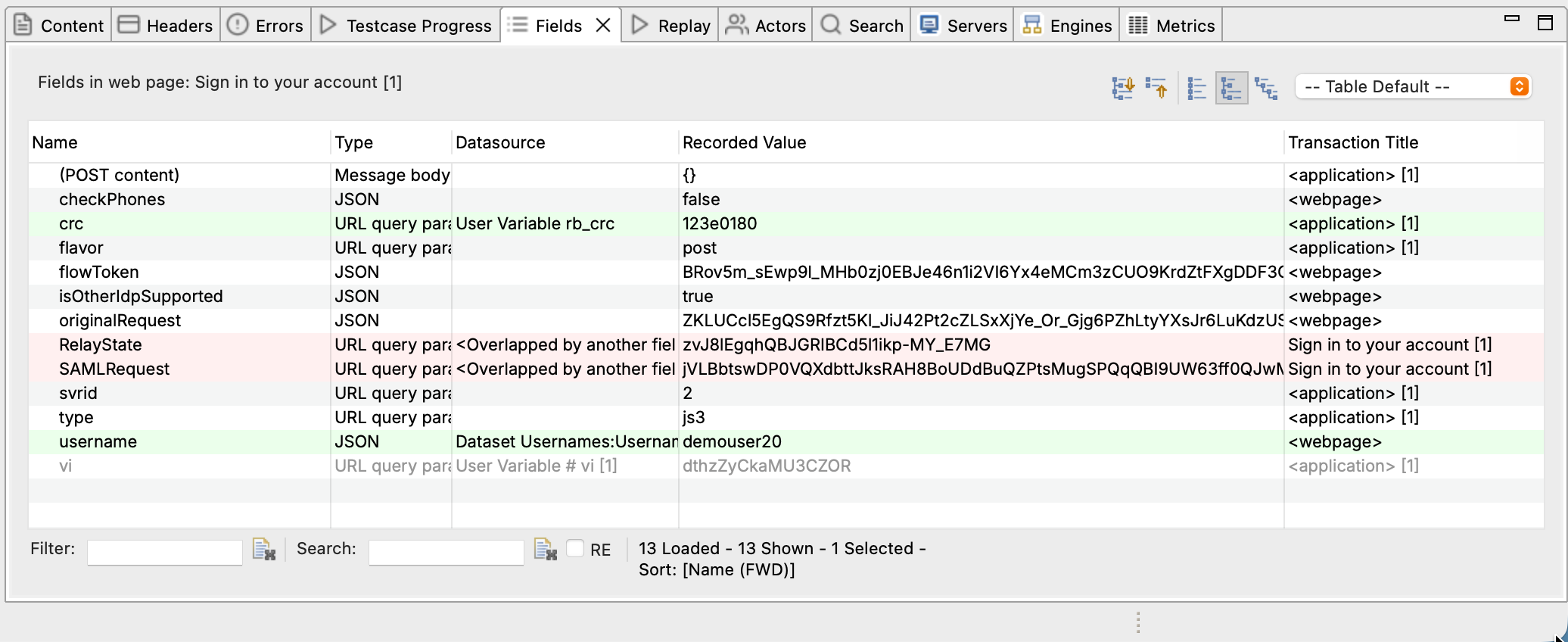
- Gray background: Field automatically configured by ASM
- White background: Field uses recorded value (not dynamic)
- Right-click → Edit: Override ASM's configuration
To see header-based state (ETags, cache headers), check the Headers View in the bottom panel.
Overriding ASM Decisions
If ASM incorrectly handles a field:
- Right-click the field in Fields View
- Select Edit
- Change the Datasource:
- Recorded: Use the original recorded value (no dynamic handling)
- Dynamic Field: Choose a different extracted value
- Dataset: Use data-driven values from a dataset file
- Custom: Enter a specific value or expression
Common Scenarios
Scenario 1: Session Cookie Not Correlating
Symptom: Replay fails with 401 Unauthorized or redirects to login page.
Cause: Session cookie was not extracted from the login response.
Solution:
1. Run ASM (if not already run)
2. Check Fields View for the session cookie (look for sessionid, JSESSIONID, etc.)
3. Verify the cookie has an extractor configured
4. If missing, manually create an extractor from the Set-Cookie header in the login response
Ask the AI Assistant
If you're stuck on session correlation, try:
- "Why isn't my session cookie correlating?"
- "Help me extract the session cookie from the login response"
- "Explain the session flow in my test case"
Scenario 2: CSRF Token Validation Failing
Symptom: Form submission fails with "Invalid CSRF token" or 422 Unprocessable Entity.
Cause: CSRF token from page A wasn't extracted and used in form submission to page B.
Solution:
1. Run ASM (it detects most CSRF patterns automatically)
2. If ASM missed it, manually locate the token in the HTML response (inspect <input name="csrf_token" ...>)
3. Create a boundary extractor to extract the token value
4. Assign the extracted value to the form field or header in the submission request
See Advanced Field Assignments for manual extractor creation.
Scenario 3: Dynamic URL Paths
Symptom: Replay fails with 404 Not Found on URLs containing UUIDs or hashes.
Cause: URL path contains a session-specific or resource-specific ID that changes per user.
Solution:
1. ASM's Universal Path Segment Detector (UPSD) handles most UUID patterns automatically
2. Check the Fields View for path segment extractors
3. For custom patterns, create a detection rule in config/dfc/ (contact support for detection rule authoring guidance)
Scenario 4: REST API with Bearer Tokens
Symptom: API calls fail with 401 Unauthorized after initial authentication succeeds.
Cause: OAuth bearer token wasn't extracted from the auth response and injected into subsequent API calls.
Solution:
1. ASM detects common bearer token patterns
2. Verify the Authorization: Bearer [token] header in the Headers View
3. Ensure the token is extracted from the login/auth response JSON
4. See OAuth & Bearer Tokens for detailed OAuth configuration
Building Realistic Test Cases
Once ASM has configured your dynamic values, there are a few crucial rules to follow if you want your test case to actually simulate real user behavior:
1. Use Real, Unique User Identities
Even if your application allows the same user to log in to multiple sessions, don't simulate more than one session per user identity.
Why this matters: The ratio of unique identities in your test to the total number of identities in the system should be close to what the system will experience in production.
How to do it: Use Datasets to provide unique credentials (usernames, passwords) for each virtual user.
2. Use Realistic Data
Wherever virtual users are entering data, it's important to enter data that mirrors the variety of real-world data.
Why this matters: When that data is written, indexed, and searched by the system, the performance of those operations can be affected by the variety or conformity of the data. If real users will all be entering distinctly different values in fields, then virtual users should be doing the same.
How to do it: Create datasets with realistic variation in product names, search terms, addresses, etc.
3. Think Time Should Be Realistic
When recording a scenario in the browser, it's natural to speed through the steps, especially after doing it several times over the course of a few days. Real users, however, take much longer to enter data and decide what to do next.
Why this matters: Accurate average think times are critical. Think times that are too long place much lower load on the system than real users would, and the system may not survive production traffic. Think times that are too short simulate a heavier load than reality, possibly leading you to over-build the system needlessly.
How to do it: Take time to find out how long real users spend in each scenario. See Load Test Concepts for guidance.
4. Real Users Have Variety
Real users have a variety of reading and typing speeds, so the think time should vary as well. We generally vary the think time +/- 25-50% from the average, depending on the complexity of the operation the user is performing.
Why this matters: Variation matters, but not nearly as much as getting the average right.
Next Steps
Now that you understand web application state and what makes a test case realistic:
- Run ASM on your test case to automatically configure dynamic fields
- Configure authentication for login flows and sessions
- Use datasets to provide realistic, varied user data
- Debug replay failures when ASM doesn't catch everything
Key Takeaway
Modern web applications are stateful. Successful load testing requires extracting dynamic state at runtime and injecting it into each virtual user's session. Application State Management (ASM) automates this for most common patterns, but understanding the underlying concepts helps you troubleshoot when automatic configuration isn't sufficient.
Related Topics: - Application State Management (ASM) Overview - Basic ASM / Dynamic Fields - Authentication - Debugging Failed Replays