Application State Management (ASM)
Modern web applications are complex. Session IDs rotate, CSRF tokens change with every request, hidden fields like __VIEWSTATE encode page state, and OAuth Bearer tokens expire. Without automation, you'd spend days manually configuring these dynamic values. Your test case would still break on the first replay.
Application State Management (ASM) solves this problem. It's a rules-based expert system with AI-powered dynamic detection that finds and configures the dynamic fields in your test case, turning a recording into a working, replayable test in minutes instead of days.
This section explains what ASM does, why it matters, and how it fits into your configuration workflow.
What ASM Does
ASM is an automated wizard that analyzes your recorded test case and configures dynamic fields so the replay actually works.
The Problem ASM Solves
Web servers and client-side JavaScript generate unique values for each user session:
- Session cookies (JSESSIONID, PHPSESSID, ASP.NET_SessionId)
- CSRF tokens (authenticity_token, _csrf)
- Hidden form fields (__VIEWSTATE, __EVENTVALIDATION in ASP.NET)
- OAuth Bearer tokens (access_token, id_token, refresh_token)
- User IDs, transaction IDs, timestamps
- Encrypted or encoded state (compressed JSON, base64-encoded data)
When you record a test case, these values are captured from your specific session. Replay the recording with those hardcoded values and the server rejects them. Your session expired, your CSRF token is invalid, your Bearer token is stale.
Without ASM: You'd manually find every dynamic field (hundreds in a typical application), determine where each value originates, configure extraction, and specify where it's used. This requires deep understanding of web protocols and takes days of work.
With ASM: The wizard runs automatically, finds dynamic fields, configures them correctly, and your test case replays. This takes minutes.
How ASM Works: Rules-Based Expert System + AI
ASM combines two complementary approaches:
1. Rules-Based Expert System (Core Engine)
ASM applies hundreds of detection rules encoding expert knowledge about common web frameworks and patterns:
Framework-specific rules:
- ASP.NET: __VIEWSTATE, __EVENTVALIDATION, __REQUESTVERIFICATION_TOKEN
- Java/Spring: JSESSIONID, Spring Security CSRF tokens
- PHP: PHPSESSID, Laravel _token
- Ruby on Rails: authenticity_token, session cookies
Protocol-level rules:
- HTTP headers: ETag, If-Modified-Since, Last-Modified
- Cookies: Set-Cookie → Cookie correlation
- OAuth 2.0: 14 detection rules for Bearer tokens, refresh tokens, JWT (see OAuth & Bearer Tokens)
Pattern-based rules:
- JSON fields: "sessionId": "...", "csrfToken": "..."
- XML elements: <SessionKey>...</SessionKey>
- Query parameters: ?token=...&userId=...
These rules run in sequence, each looking for specific patterns and configuring fields when matches are found.
2. AI-Powered Dynamic Detection (v7.0)
In v7.0, ASM includes AI analysis that complements the rule-based engine:
AI assists with: - Unknown frameworks: Detects dynamic fields in applications the rules don't explicitly know - Custom patterns: Identifies application-specific field naming conventions - Complex scenarios: Analyzes relationships between fields the rules miss - Troubleshooting: Explains why fields were or weren't configured
How AI and rules work together: 1. Rules run first (fast, deterministic, handles 95% of common cases) 2. AI analyzes what rules missed (slower, handles edge cases and unknowns) 3. Combined results produce complete field configuration
Rules + AI = Best of Both Worlds
Rules provide fast, reliable detection for known patterns. AI fills the gaps for custom applications and edge cases. Together they handle virtually any web application automatically.
How ASM Is Invoked
ASM is the second page of the Configure for Replay wizard. Hostname restriction is page one, ASM is page two. You almost always want to run the full wizard rather than ASM standalone, because filtering out third-party hostnames first means ASM does less wasted work and your Fields View stays clean. See Run the Configure for Replay Wizard for the full pre-replay flow and why hostname restriction matters.
After Recording: The Wizard Runs Automatically
When you finish a recording, the Configure for Replay wizard opens automatically. You step through hostname restriction, then ASM runs and configures the test case. By the time the wizard closes, the test case is ready to replay.
This is the path most users will use, and it's the recommended one for first-time configuration of any test case.
Re-running After a Change
If you've already configured a test case and then changed it (added or removed transactions, modified a page, fixed an authentication problem), you'll want to re-run ASM. Two paths:
- Full wizard: Right-click the test case in the Navigator → Configure → Configure for Replay... Walks you through hostname restriction again, then re-runs ASM. Useful when the change might have brought in new hostnames.
- ASM standalone: Right-click the test case → Configure → Application State... Skips straight to ASM. Useful when hostnames are already correct and you just want fresh extractors. Faster, but won't catch new third-party domains.
When to re-run ASM:
- You edited the test case (added or removed transactions)
- Initial ASM run failed or produced incomplete results
- You want to try different ASM settings
- Replay is failing and you suspect field misconfiguration
What ASM Configures
Dynamic Fields (Most Common)
Form fields submitted in POST requests:
- Hidden fields (<input type="hidden">)
- CSRF tokens
- Session identifiers
- State data (__VIEWSTATE)
Where ASM finds values: - Previous HTML responses (embedded in page) - JSON/XML API responses - HTTP headers (Set-Cookie, custom headers) - Query parameters in redirect URLs
Where ASM applies values: - Form POST data - Query parameters in URLs - HTTP request headers (Cookie, Authorization) - JSON/XML request bodies
HTTP Headers
Server-managed headers ASM configures automatically: - ETag / If-None-Match: Conditional requests for caching - Last-Modified / If-Modified-Since: Cache validation - Cookie: Correlated from Set-Cookie headers
OAuth Bearer Tokens (v7.0)
ASM's OAuth detection rules handle Bearer tokens automatically:
- Extracts access_token from JSON responses
- Applies to Authorization: Bearer <token> headers
- Configures refresh token logic for long-running tests
See OAuth & Bearer Tokens for details.
Viewing ASM Results
After ASM runs, inspect the Fields View to see what was configured:
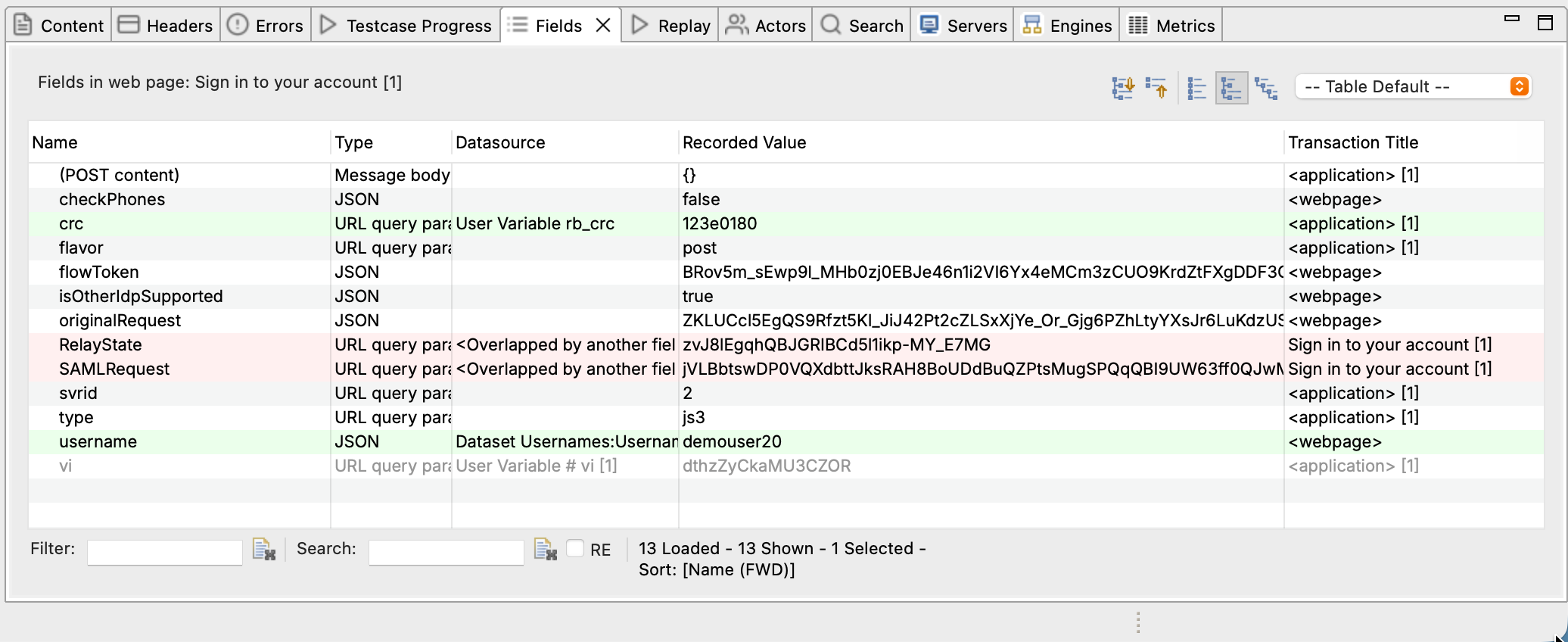
Fields View Indicators
Grey background = Automatically configured by ASM - ASM detected this field as dynamic - Configured datasource (extraction and assignment) - Safe to use as-is in most cases
White background = Not configured by ASM - Either static (hardcoded value is correct) - Or ASM didn't detect it as dynamic - May need manual configuration if replay fails
Field details:
- Field Name: Variable name (e.g., csrfToken, sessionId)
- Datasource: Where value comes from (e.g., Server authentication header, Extractor[1])
- Value: Current value (from recording or extraction)
Overriding ASM Configuration
ASM gets it right about 95% of the time. When it doesn't, you can override:
- Right-click field in Fields View → Edit
- Change datasource:
- Recorded: Use hardcoded value from recording (disable correlation)
- Server authentication header: Use OAuth Bearer token
- Extractor: Use custom boundary extraction
- Dataset: Use value from CSV/database
- Click OK
Ask the AI About Field Configuration
ASM Configuration Topics
ASM is powerful but has many features. This overview covers the basics; the following topics go deeper:
Core ASM Concepts
Basic ASM / Dynamic Fields - How dynamic field correlation works - Understanding extractors and assignments - Viewing field configuration in Fields View - Troubleshooting common correlation issues
Advanced Field Assignments - Multi-part assignments (concatenation, templates) - Conditional assignments (if/then logic) - Custom datasources (code-based values) - Complex extraction scenarios
ASM Features
Dynamic Named Fields
- Fields with dynamic names (e.g., field_12345)
- Array indexing and wildcard matching
- Correlating fields when names change every session
Auto-Ignore & Equivalent Fields - Fields ASM ignores automatically (timestamps, random values) - Equivalent field names (synonyms across frameworks) - When to override auto-ignore behavior
Extractors & Boundary Extraction - Creating custom extractors for non-standard patterns - Boundary extraction (left/right delimiters) - Regular expression extractors - Debugging extraction failures
Common ASM Scenarios
Scenario 1: ASM Runs, Replay Succeeds
What happened: ASM correctly configured all dynamic fields.
Next steps: 1. ✅ Review Fields View to understand what was configured 2. ✅ Run a load test to verify it works under load 3. ✅ Configure datasets if you need multiple users
This is the ideal outcome, and it happens for most well-designed web applications.
Scenario 2: ASM Runs, Replay Fails with 401/403
What happened: Authentication fields weren't configured correctly.
Likely causes: - Session cookie not correlated - Bearer token not extracted - CSRF token missed by ASM
Next steps: 1. Check OAuth & Bearer Tokens if using OAuth 2. Check Basic Authentication for form-based login 3. Ask AI to diagnose the authentication failure
Authentication Debugging
Scenario 3: ASM Runs, Replay Fails with 404/500
What happened: URL or form data contains uncorrelated dynamic values.
Likely causes:
- Transaction ID in URL path (e.g., /order/12345)
- POST data field missed by ASM
- Complex multi-step correlation
Next steps: 1. Check Dynamic Named Fields for URL path variables 2. Manually configure missed fields in Fields View 3. Ask AI to identify which field is causing the 404
Field Correlation Help
Scenario 4: ASM Detects Too Many Fields
What happened: ASM configured fields that don't need correlation (e.g., static values that happen to look dynamic).
Likely causes: - Timestamps or dates in form data - Product IDs or category IDs that are actually static - Over-aggressive detection rules
Next steps: 1. Check Auto-Ignore & Equivalent Fields to understand what ASM ignores 2. Manually change field datasource to Recorded if value should be hardcoded 3. Run replay to verify the change fixes the issue
Best Practices for Working with ASM
1. Always Run ASM After Recording
Never skip ASM, even if you think your application is simple. Most applications have hidden dynamic fields (session cookies at minimum).
2. Review Fields View After ASM
Spend 2 minutes reviewing the Fields View to understand what ASM configured. This helps you troubleshoot faster if replay fails.
3. Let ASM Run to Completion
ASM can take 30 seconds to 2 minutes depending on test case size. Don't interrupt it; let it finish analyzing all transactions.
4. Use AI for Complex Scenarios
If replay fails after ASM and you're not sure why, ask the AI. It can analyze field configuration and suggest fixes faster than manual troubleshooting.
5. Re-run ASM If You Edit the Test Case
If you add or delete transactions after ASM ran, re-run ASM to reconfigure fields. Old configuration may no longer be valid.
ASM vs Manual Configuration
Why not just configure fields manually?
You can. But consider:
ASM Advantages
✅ 10x faster: Minutes vs days for complex applications ✅ Less error-prone: Catches fields humans might miss ✅ Handles complexity: Multi-step correlation, conditional logic ✅ Framework knowledge: Knows ASP.NET, Spring, Rails patterns ✅ Consistent: Same analysis every time
When Manual Configuration is Needed
Sometimes ASM misses edge cases and you need manual configuration:
- Custom application-specific patterns ASM doesn't recognize
- Complex multi-step correlation across many transactions
- Non-standard field naming or encoding schemes
For these cases, see Advanced Field Assignments and use the AI to help configure manually.
ASM Technical Details
Detection Rule Categories
ASM runs over 300 detection rules organized in categories:
Priority order (rules run top to bottom): 1. Platform-specific (ASP.NET, Java, PHP) 2. Protocol-level (HTTP headers, cookies) 3. OAuth & authentication (Bearer tokens, CSRF) 4. JSON/XML patterns (API field extraction) 5. Form field patterns (hidden fields, input names) 6. Generic heuristics (catch-all for unknowns)
Rule execution: - Rules run sequentially (not in parallel) - Early rules take precedence (specific before generic) - Each rule can configure multiple fields - Rules can depend on previous rules (multi-stage correlation)
AI Analysis Details
When AI runs: - After rule-based engine completes - Only on fields/patterns rules didn't handle - Can be disabled in ASM settings (not recommended)
What AI analyzes: - Response content (HTML, JSON, XML) - Request/response header patterns - Field name conventions - Value patterns and formats - Relationships between transactions
AI output: - Field configuration recommendations - Confidence scores (high/medium/low) - Explanation of why field needs correlation - Alternative configuration suggestions
Next Steps
- Run ASM on your test case - Step-by-step guide
- Understand field correlation - Core concepts
- Configure OAuth authentication - Bearer token handling
- Debug replay failures - Fix correlation errors
Related Topics: